@

Showing posts with label cable. Show all posts

Wednesday, December 14, 2011

How to replace car Brake Cable?

The Brake cable is actually three parts: ---
A forward cable, intermediate cable and rear cable. 
The forward (front) cable attaches between the pull handle/foot pedal emergency brake actuator and the intermediate cable that's between the forward and rear cable units.The rear brake backing plate puts into motion the rear brake shoes/pads to prevent movement of the vehicle. Occasionally, you'll encounter another brake system cable that actuates a band/clamp style emergency brake set up.
See below how this cable looks


First inspect the brake cable components,before replacing it.
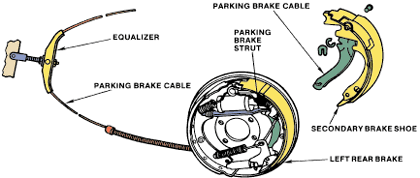
The details with proper diagram is as follows :----

Integral parking brake components.
  • Check the parking brake for free movement of the parking brake cables in the conduits.
  • If necessary, apply a lubricant to free the cables.
  • Check for worn equalizer and linkage parts.
  • Replace any defective parts.
  • Check for broken strands in the cables.
  • Replace any cable that has broken strands or shows signs of wear.
During a rear brake job, the emergency brake cables are disconnected from the brake linings.
  • This provides a good opportunity to lubricate the cables.
  • From the underside of the vehicle, pull the cables as far as possible.
  • Wipe them off and inspect them.
  • Apply clean grease to them and push them back into their sheaths.
  • Another way of lubricating a cable is to apply penetrating oil to its sheath (the metal cover that surrounds it).
  • Usually, you can only do this on the ends where the cable has no plastic insulating cover.


  • The parking brake cable usually has a spring-loaded clip that fits into the brake backing plate.
  • If a parking brake cable requires replacement, use a small hose clamp to help remove it from the backing plate.

See the image below for more help.

Use a small hose clamp to depress the retaining tabs.


This details will help you.
---------------
If you need dis-assembly or replacement instructions for any other auto/car part, or you want to ask question related to your car/truck jeep problem then please leave the comment with your details, so I can provide you the required instructions and solutions.
For more brake related help solutions,see the list below

Abs and service light comes on?

All types of brake problems and repairs

http://howtobyme.blogspot.com/2011/11/abs-and-service-light-comes-on.html


ABS light stays on but brakes work fine?

http://howtobyme.blogspot.com/2011/11/abs-light-stays-on-but-brakes-work-fine.html

VCS maintenance required on Toyota Camry?

http://howtobyme.blogspot.com/2011/11/vcs-maintaince-required-on-toyota-camry.html

VCS and ABS lights go on and off intermittently on Lexus?

http://howtobyme.blogspot.com/2011/11/vcs-and-abs-lights-go-on-and-off.html

ABS & Brake lights warning indicator steady on dash and speedometer not working for Dodge Ram?

http://howtobyme.blogspot.com/2011/11/abs-brake-lights-warning-indicator.html

E-brake is stuck down on Ford Focus?

http://schematicsdiagram.blogspot.com/2011/12/e-brake-is-stuck-down-on-ford-focus.html

When the car stops, abs pump turns ON?

http://howtobyme.blogspot.com/2011/12/when-car-stopsabs-pump-turns-on.html

Where is Power Brake Booster located on 1995 Lincoln Town Car?

http://howtobyme.blogspot.com/2011/12/where-is-power-brake-booster-located-on.html

Sometimes ABS light comes on while Driving?

http://howtobyme.blogspot.com/2011/12/sometimes-abs-light-comes-on-while.html

How Anti-Lock Brakes Work?


Brake System Troubleshooting?

http://technoanswers.blogspot.com/2011/11/brake-system-troubleshooting.html

Car Brake lines have no pressure?

http://schematicsdiagram.blogspot.com/2011/12/car-brake-lines-have-no-pressure.html

How to Disconnect Power to EBCM on PontiacGrand Prix?

http://schematicsdiagram.blogspot.com/2011/12/how-to-disconnect-power-to-ebcm-on.html

Where is ABS/TCS module located on 2005 Cadillac Deville

http://schematicsdiagram.blogspot.com/2011/12/where-is-abstcs-module-located-on-2005.html

How to Replace Power Brake Booster on 1996 GMC Jimmy?

http://schematicsdiagram.blogspot.com/2011/12/how-to-replace-power-brake-booster-on.html

Isuzu Trooper Shifts hard and Engine Revving in stop?

http://schematicsdiagram.blogspot.com/2011/12/isuzu-trooper-shifts-hard-and-engine.html


Saturday, November 26, 2011

How to record TV program?

The details to Record TV program is as follows :-----

Most of the time we watch TV programs with our cable satellite receiver/decoder. And sometimes we would love to record these programs so that we can watch them again. You can learn how to record your TV program while you watching a TV program. 

All you will be needing is a DVD recorder or VCR (Video cassette Recorder). It all depends on the one you prefer.

There are two methods of doing this connection. 1. is RF connection and the other is RCA. But I will start with the RF connection method;

This is how is works. Get a RF cord, check the back of your TV, you would see RF in, connect the RF into TV in, then connect the other part to RF Out at the back of the Cassette or DVD Recorder.

Turn the Cassette or DVD Recorder and the TV on. Go to Channel 1 or any channel on the TV, search the TV stations automatically or manually in order to get a display of the Cassette or DVD Recorder on the TV. To easily get the Cassette or DVD Recorder's station, play a movie on the Cassette or DVD Recorder while you search for the station. Once you see the display of the movie on your TV, you would easily know that that's the Cassette or DVD Recorder station. 

Once you have gotten a display from the Cassette or DVD Recorder, save the channel on the TV.

Then get another RF cord, connect it to "RF out" at the back of the Satellite/cable decoder/receiver and the other part to "RF in" at the back of the Cassette or DVD Recorder.

Now with the Satellite/cable decoder/receiver turned on and the Cassette or DVD Recorder also turned on, press the Cassette or DVD Recorder's channel, you should find search. Scan for channel/stations on the Cassette or DVD Recorder just like you did on the TV and you will find a display of the Satellite/cable decoder/receiver showing on the TV via the Cassette or DVD Recorder. Note that on some Cassette or DVD Recorder, you will have to select "Source" to RF before you can get a display of the channel.

Now since the Satellite/cable decoder/receiver program is now showing via the Satellite/cable decoder/receiver, insert a black disc or cassette into the Recoder and press record. The Satellite/cable decoder/receiver programs showing on the TV via the player will be recorded and that would be all.

For some recorders that has internal hard drive, you can just press record without inserting a blank disc......

USING RCA CONNECTION METHOD.

You could also achieve this by using a RCA (yellow, red and white cord).

The connection procedure is the same with the RF explained above.

Connect the Recorder to the TV. That is, from "Video and audio Out" of the recorder to "video and audio in" of the TV accordingly. Press AV or source on the TV to confirm that there is a display from the recorder on the TV.

Now connect the RCA cord to "OUT" from the Satellite/cable decoder/receiver to "IN" at the back of the Recorder.

Then, press source on the recorder to "INPUT" (RCA) and the Satellite/cable decoder/receiver's program will automatically display on the TV. 

While the Program is being displayed on the TV via the recoder, insert a blank disc and press record on the player and it will automatically start recording. You will see the record or record symbol while the recoding is in progress.


----------
This tips will help you.
Thanks.
---------------

Monday, November 14, 2011

How to Access Grille on Acura Integra?

The details with diagrams is as follows :---


Grille


REMOVAL & INSTALLATION


See Figure 1
Click image to see an enlarged view
Fig. Fig. 1: Exploded view of the front grille removal-3.5RL shown, others similar
  1. Disconnect the negative battery cable.
  2. Open and support the hood.
  3. Remove the grille retaining nuts/screws and any retaining clips, then remove the grille.
To install:
  1. Position the grille, making sure the retaining clips are secured, then tighten the retaining screws.
  2. Lower the hood.
  3. Connect the negative battery cable.


-----------
For more car related problem troubleshooting:---

This are the sections, you can go through and click the link to read its troubleshooting.

---------

The car will not start?

-----------------

Car will not crank?


-----------

Car has no spark?


-------------

How to troubleshoot car battery?

-----------------

How to test starter solenoid?

http://schematicsdiagram.blogspot.com/2011/06/how-to-test-starter-solenoid.html

--------------------

How to test cars starter?

http://schematicsdiagram.blogspot.com/2011/06/how-to-test-cars-starter.html

How to replace starter in car?


-----------

car will turn over but will not start?


-----------------

Car wont start?


----------

@